Lead retrieval at trade shows: how every exhibitor leaves with qualified leads
Paper forms, business cards or a lead retrieval app: what organisers prepare so every exhibitor leaves the show with a list of qualified leads.
By Moultaka team
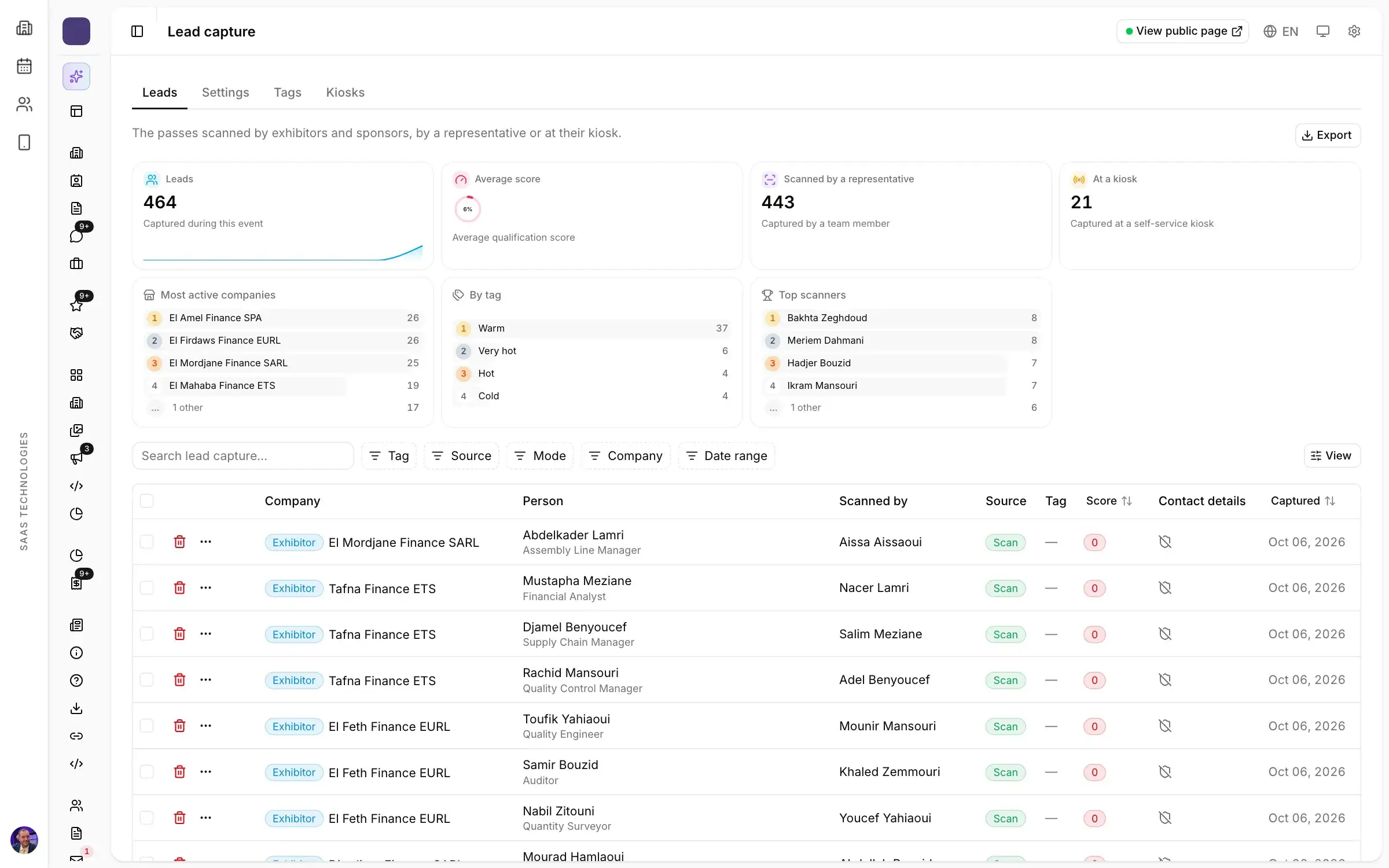
Lead retrieval is how exhibitors take home the people they met at your show: who they are, what they need and what happens next. A lead retrieval app for trade shows does it by scanning the visitor’s badge, so the lead arrives complete, tagged and ready to export instead of scribbled on a card. Exhibitors judge a show by the leads they bring back, which makes lead retrieval the organiser’s business as much as theirs: an exhibitor with a list of qualified leads has a concrete reason to book again.
What a good lead looks like
Whatever the tool, a useful lead answers five questions:
- Who? Name, company, job title and a way to reach them. If badges are tied to registration, none of this needs typing.
- What do they need? One line, written by the person who had the conversation, while they still remember it.
- How interested are they? A simple scale, such as cold, warm and hot, that the whole stand team applies the same way.
- Did they agree to be contacted? Consent, recorded at the moment of the scan.
- What is the next step? A call, a quote, a meeting.
Anything beyond that slows the exhibitor down while the next visitor waits at the stand.
Paper, business cards or badge scans
Most shows still see all three on the floor.
Paper forms are filled in standing up, between two conversations. Handwriting is hard to read, sheets vanish into the boxes packed on the last evening, and someone has to type everything in back at the office.
Business cards give an identity and nothing else. Three days later the exhibitor holds a stack of cards and cannot remember which one was the urgent project.
Badge scans take two seconds. Exhibitor staff scan the QR code on the visitor’s badge with their phone, add a tag and a note, and the lead joins the company’s list with the date, the time and the name of the person who scanned it.
What a lead retrieval app for trade shows should do
When you choose the lead retrieval tool you offer exhibitors, check that it:
- reads the badges your show already issues, without a second registration;
- lets each exhibitor decide which staff members may scan;
- applies the same tags and scoring to every exhibitor, so results compare after the show;
- shows the consent text and records the answer with each lead;
- lets exhibitors export their own leads once the show is over;
- gives you, the organiser, a view of how many leads each company captured.
A tool that sits outside your registration data fails the first point, and the morning of the opening is a bad time to find out.
Consent comes before the first scan
A scanned lead is personal data, and visitors should know what will happen to their details. In Europe that means GDPR; most countries in the Middle East and North Africa now have data protection laws of their own.
The simplest rule: one short consent text for all exhibitors, shown at the moment of the scan, with the answer stored alongside each lead. Write it before the show and put it in the exhibitor manual, so no exhibitor improvises one on the floor.
What the organiser sets up before opening day
Lead retrieval is decided in the organiser’s office, not on the stand.
- Badges every exhibitor can read. Every visitor needs a badge with a QR code, printed at the entrance or received by email: the same groundwork as badges and access with no queue.
- Who may scan. Each exhibitor’s staff, registered in advance with the rest of their file. Exhibitor management is the right moment to collect them.
- One set of tags. Cold, warm, hot, and a qualification score. If every exhibitor invents a scale, no figure compares afterwards.
- A one-page brief. How to scan, what to note, where to find the list. Sent a week before opening, repeated on the first morning.
Some organisers include lead retrieval in every stand; others keep it for larger packages or for sponsors. Either way, announce it when you sell the stand: it is an argument exhibitors understand immediately.
On the stand and during B2B meetings
Exhibitors meet prospects in two ways: by chance, when a visitor stops at the stand, and by appointment, during the B2B meetings booked before the show. Both should end up in the same list.
On the stand, a scanned badge records the encounter and the lead. With B2B meetings, the encounter is already known: who, at what time, in which room, and whether it took place. When both live in the same tool, exhibitors have no second list to merge in the evening, and you see the full value your show created for them. For the meetings programme itself, see our guide to B2B meetings at a trade show.
After the show: the list, then the proof
The day after closing, each exhibitor exports their leads and hands them to sales. The sooner the list arrives, the better the visitor remembers the conversation.
For you, the same data becomes an argument:
- at rebooking time: “your team met this many qualified visitors, this many tagged hot” lands better than a general sense of footfall;
- for sponsors: the leads each sponsor collected belong in the proof you send them, next to their other benefits (see sponsorship fulfilment);
- for the next edition: the halls and hours where stands scan the most tell you where to place activities and meetings.
In short
- A useful lead answers five questions: who, what need, how interested, what consent, what next.
- Badge scanning replaces paper forms and business cards, provided the organiser has prepared badges, scanning rights and shared tags.
- Consent is written before the show, once, for every exhibitor.
- Stand leads and B2B meeting contacts belong in the same list, exported by the exhibitor after the show.
In Moultaka, lead capture is part of Meetings & networking: exhibitor staff scan badges from the app, leads arrive tagged and scored with consent recorded, and exhibitors export them after the show. To see it on your own show, book a demo.